
Advertorial
Hostile web design

The illusion of control: why clicking 'X' on pop-ups makes things worse

You open a recipe blog to find one measurement, and before a single word loads the screen dims and a box lunges at you demanding your email. Your eyes go straight to the corner, hunting the little "X." You click it. A new tab explodes open, and suddenly you are staring at an online casino or a fake virus warning you never asked to see. Here is the uncomfortable truth: you did not misclick. The button did exactly what it was built to do.

Blocks pop-ups before they render · your clicks stay yours · pages load lighter and faster

This article is about why that button lies, why fighting it by hand costs you more than time, and how to stop the whole mess before it ever reaches your screen.

The psychology of hostile web design

The trick has a name. Designers call it a Dark Pattern — an interface built not to help you but to steer you into an action you never meant to take. The close button is the industry's favorite target, because everyone reaches for it the same way, without thinking.

That reflex is the whole point. Years of using computers have trained your hand to find the "X" in the top corner and click. Advertisers know this better than you do, so they exploit it. Sometimes the "X" is not a button at all but a small graphic wired to a hyperlink, so the gesture you trust to dismiss an ad instead opens it. Other times the entire background behind the pop-up is one big invisible trigger, waiting for any click to fire. Miss the real target by a few pixels and you have "engaged."

Tactic 1

The hyperlinked "X"

The close icon is a graphic wired to a link, so the gesture that should dismiss the ad opens it instead.

Tactic 2

The invisible trigger

The whole background behind the pop-up is one big clickable target, waiting for any tap to fire.

Tactic 3

The guilt-trip prompt

A "No thanks" button worded to make you feel bad — and every interaction with it still counts as engagement.

The goal

A billable click

A click looks identical in the data whether you wanted it or not, so your instinct to escape becomes revenue.

Why go to all this trouble? Money. Ad networks pay on clicks, and a click looks identical in the data whether you wanted it or not. By turning your instinct to escape into a click they can bill, advertisers inflate their numbers using nothing but your muscle memory. The ad that refuses to close isn't broken. Closing it was never the option on offer.
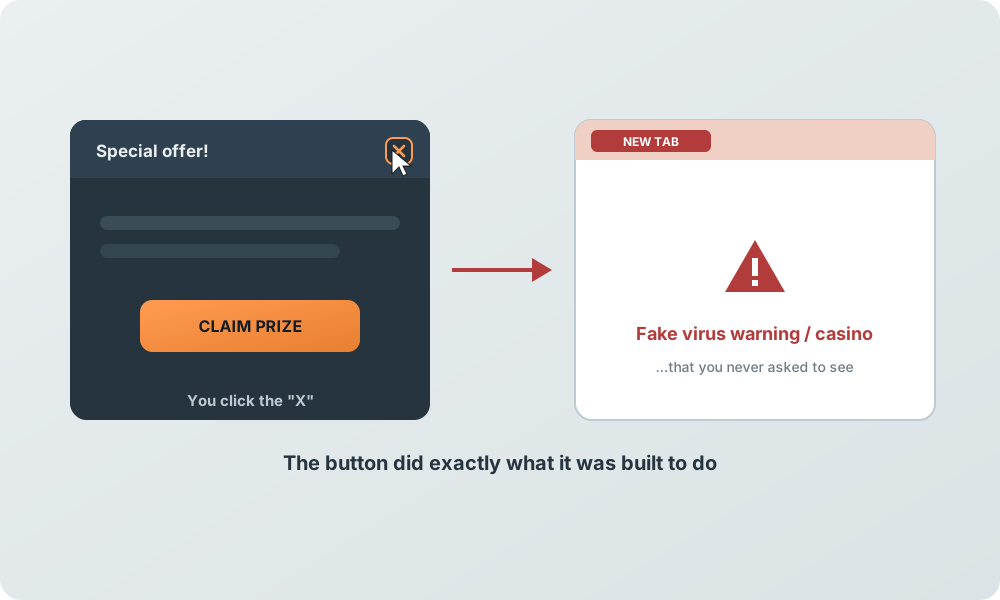
Diagram: clicking the close button on a pop-up opens an unwanted new tab with a fake virus warning or casino
The "X" you trust to dismiss the ad is often wired to open it instead.

The invisible cost of engagement

Losing thirty seconds to a fake button is annoying. What happens quietly underneath is worse.

Every move you make against these things is measured. Hunting for the genuine close button, scrolling past a video that clings to the corner, clicking "No thanks" on a prompt designed to make you feel guilty — all of it registers as interaction. To the algorithm sorting audiences, an interaction is a signal, and it does not care that yours was frustrated or accidental. A click is attention, and attention is the product being sold.

Your screen is active, your reflexes respond, your attention can be nudged. It files you as a responsive user — the last label you want.

So the system draws a conclusion about you and files you as a responsive user. The reward for engaging, even by mistake, is more of the same and worse. The next site loads heavier pop-ups, stickier videos, more aggressive overlays, because the profile now says you are the kind of visitor who reacts. Playing the game harder only teaches the game to come after you harder.

Escaping the whack-a-mole trap

There is no winning a contest where your opponent writes the rules mid-play and rewrites them the moment you adapt. If the "X" is a decoy and every touch feeds the machine, then sharpening your own reflexes is not a strategy. It is the trap working as designed.

The exit is not faster clicking or keener eyes. It is refusing to play the round at all. Instead of getting better at closing pop-ups, the real fix is making sure they never load, so there is nothing to close, nothing to misclick, and nothing to report back about you. That means dropping the reactive stance entirely — no more spotting and dismissing — and moving the defense to a point before any of it reaches the screen.

Changing the rules with the Total Adblock Browser Extension app

A Dark Pattern only works once it is drawn on your screen. That is its single dependency, and it is also its weakness. Stop the code that builds the overlay from running, and the fake button, the sticky video, and the guilt-trip prompt simply never exist for you to fight.

That is the point where the Total Adblock Browser Extension app steps in. Rather than leaving you to guess which "X" is safe and which one launches a casino, it watches the network requests a page fires the instant you load it. The servers reaching out to deliver modal overlays, clinging video players, and counterfeit close buttons are identified and cut off before the browser renders them. The pop-up is never painted, so you spend zero cognitive energy dismissing it — and because it never appears, you never generate the accidental click that gets you flagged as responsive in the first place.
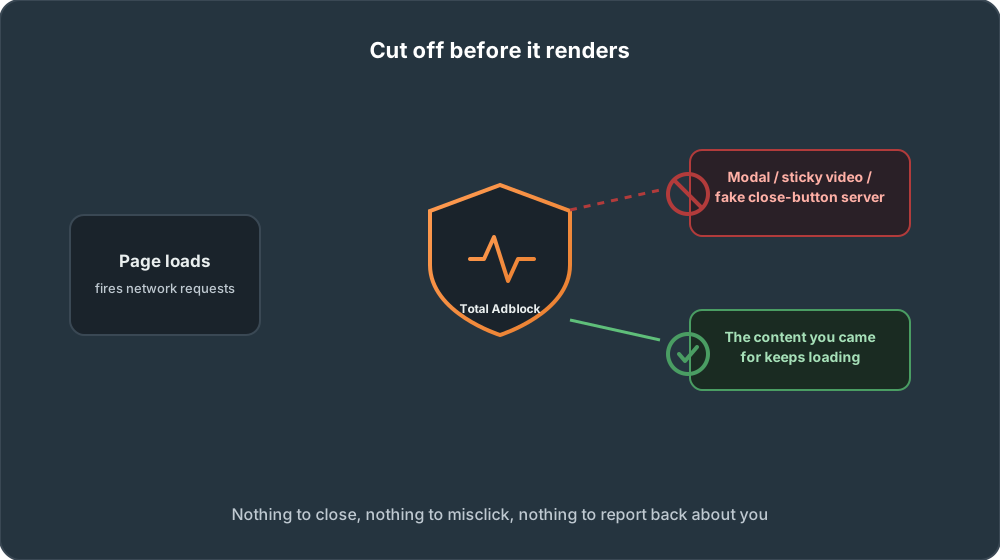
Diagram: pop-up and fake close-button servers are cut off before the page renders, while the real content keeps loading
Hostile requests are refused before render; the content you came for keeps loading.
Honest about the edges: this works by refusing the connections that serve these hostile elements, so it acts on pages you load from here forward, and it targets the servers known for this behavior rather than every piece of a site. The ordinary content you actually came to read keeps loading. What disappears is the layer built to trick you.
How it works

Up and running in four steps

Move your defense to before the pop-up renders — no configuration required.

1

Install

Add the Total Adblock Browser Extension app to your browser. No technical setup required.

2

Set up

Choose your protection level. Default settings filter the servers known for modal overlays and fake close buttons.

3

Activate

Turn on filtering so hostile network requests are cut off the instant a page tries to load them.

4

Use

Browse as usual. Pop-ups never render, so there is nothing to close and no accidental click to report.

Results

What changes when pop-ups never load

Not a promise to win the game — a way to refuse the round entirely. Individual results may vary.

0

Fake "X" hunts

Nothing renders, so there's nothing to close.

0

Accidental clicks

No misclick to flag you as responsive.

1

Dependency broken

The overlay never gets drawn on your screen.

Lighter pages

Blocked requests mean less to load.

No more decoy buttons

Counterfeit close buttons never appear, so your clicks stay yours.

Attention stays private

No accidental interaction to log, so you're not filed as a responsive target.

Faster, lighter browsing

Refused overlays and sticky videos mean pages load with less weight.

How the defense works

Stop the overlay before it's drawn

Three steps that move the fight to before the pop-up ever reaches your screen.

1. Watch the requests

The app monitors the network requests a page fires the instant you load it.

2. Identify the culprits

Servers delivering modal overlays, clinging videos, and counterfeit close buttons are singled out.

3. Cut them off

Those connections are refused before the browser renders them, so the pop-up is never painted.

Pricing

Total Adblock: Free vs Premium

Total Adblock offers a limited free tier and a paid Premium plan. Here's how they compare so you can decide what fits. Pricing and features are promotional and can change — check the official Total Adblock site for current details in your region.

Comparison of Total Adblock Free and Premium plans
Feature Free Premium
Basic ad blocking (lesser-known sites)
Ad blocking on major sites (YouTube, Facebook, etc.)
Video-ad blocking
Blocks unwanted browser notifications & pop-ups
Tracker / privacy protection
Bundled TotalAV antivirus subscription
Priority support
Typical price (US, promotional) $0 ~$19 first yearthen renews ~$99/year · 7-day free trial

Prices shown are indicative introductory figures for the United States and may vary by region and promotion; the renewal price applies after the first year. Always confirm the current price and terms on the official Total Adblock website before purchasing. This page may earn a commission from purchases made through its links.

FAQs

Pop-up dark patterns, answered

Why the close button lies, what your clicks reveal, and how Total Adblock stops it.

The tactic

A Dark Pattern is an interface built not to help you but to steer you into an action you never meant to take. On pop-ups, the close button is a favorite target: it looks like a way out but is wired to do something else, because everyone reaches for the "X" the same way without thinking.
Sometimes the "X" is not a button at all but a small graphic wired to a hyperlink, so the gesture you trust to dismiss an ad instead opens it. Other times the entire background behind the pop-up is one big invisible trigger. Miss the real target by a few pixels and you have "engaged" — and ad networks pay on clicks whether you wanted them or not.
Yes. Every move against these elements is measured as interaction, and the algorithm does not care that yours was frustrated or accidental. It files you as a responsive user, and the reward for engaging is more of the same: heavier pop-ups, stickier videos, and more aggressive overlays on the next site.

The fix

It watches the network requests a page fires the instant you load it. The servers reaching out to deliver modal overlays, clinging video players, and counterfeit close buttons are identified and cut off before the browser renders them. The pop-up is never painted, so there is nothing to close and no accidental click to flag you as responsive.
It targets the servers known for serving hostile elements rather than every piece of a site, so the ordinary content you actually came to read keeps loading. What disappears is the layer built to trick you.
It works by refusing the connections that serve these hostile elements, so it acts on pages you load from here forward — preventing the pop-up from rendering in the first place rather than dismissing one that is already on screen.

Plans & pricing

Yes, a limited free tier blocks ads mainly on lesser-known sites (outside roughly the top 15,000 most-visited websites), so it does not block ads on most major sites people use daily. Premium adds unlimited ad blocking, notification and pop-up blocking, tracker protection, and a bundled TotalAV antivirus subscription.
Pricing is promotional and changes often. New users typically pay an introductory first-year price of around US $19, which then renews at about US $99 per year. A monthly option also exists. Always check the official Total Adblock website for current pricing in your region.

Stop playing a rigged game against your own reflexes

Let the Total Adblock Browser Extension app cut the pop-up off before it renders, so your clicks stay yours, your attention stays private, and pages load lighter and faster.

  • Pop-ups blocked before render
  • No decoy close buttons
  • Attention stays private
  • Lighter, faster pages
Instantly remove annoying pop-ups with Total Adblock

This page is a paid advertorial brought to you by digitallivingpulse.com. It is intended for promotional purposes only and should not be considered independent journalism, editorial content, or consumer advice. The content has been created or curated by the advertiser and may include affiliate links. We may receive compensation if you purchase, subscribe to, download, or install the featured software through the links provided. Results may vary depending on individual circumstances and product usage. Please refer to our Disclaimer and Privacy Policy for more information.